Set your agent's language, dialect and tone
Choose the reply language, Arabic dialect, tone and answer length, and decide whether your agent follows each visitor's language.
4 min readاقرأ المقال بالعربية
In Behavior you choose how your agent talks: which language it replies in, which Arabic dialect, what tone, and how long its answers are. These settings don't change what the agent knows, only how it says it.
Who can do this: members who can edit agents. Members who can only view them see the settings but can't change them.
Open the settings
Open your agent, then Behavior.
Choose Profile & replies.
The page has a Profile card with the agent's name and reply language, then a How it replies card with its role, tone, answer length and dialect.
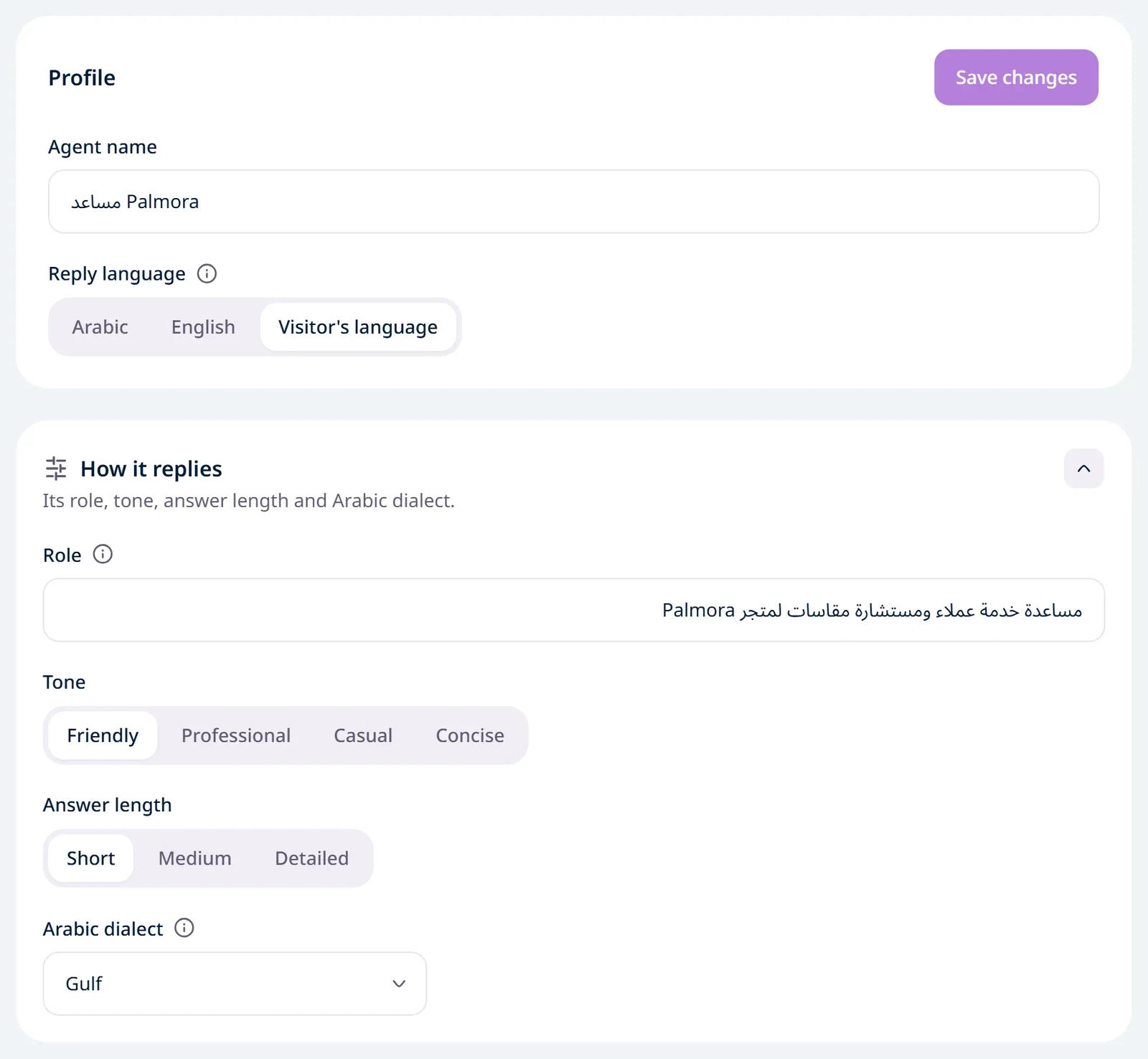
Name and reply language
In the Profile card:
Agent name: the name your visitors see in the chat window.
Reply language: three options.
Option | What happens |
|---|---|
Arabic | Every reply is in Arabic, even when the visitor writes in English. The chat window is always in Arabic. |
English | Every reply is in English, even when the visitor writes in Arabic. The chat window is always in English. |
Visitor's language | The agent replies in the language of the visitor's latest message. The chat window starts in their browser's language, then follows the language they write in, message by message. |
Then click Save changes at the top of the card.
Your content doesn't need to be in both languages. If your site is Arabic only and a visitor asks in English, the agent translates what it uses and replies in English, as long as the reply language is English or Visitor's language.
How it replies
In the How it replies card:
Setting | Options |
|---|---|
Role | One line on who the agent is for your visitors, for example "Sales assistant for a furniture store". Leave it empty for a customer support assistant. |
Tone | Friendly (the default), Professional, Casual or Concise. |
Answer length | Short: one or two sentences. Medium (the default): one to four sentences. Detailed: up to two short paragraphs, or a list of steps. A simple question still gets a short answer. |
Arabic dialect | Visitor's dialect (the default), Modern Standard Arabic, Egyptian, Gulf or Levantine. |
Then click Save changes under the Rules card. That button saves How it replies and Rules together.
How the dialect works
The dialect is used only when the agent replies in Arabic. With the reply language set to English, it has no effect.
Visitor's dialect: the agent answers each visitor the way they write. A visitor writing in Gulf Arabic gets a Gulf reply, one writing in Egyptian gets an Egyptian reply, even when your content is in Modern Standard Arabic. It uses simple Modern Standard Arabic when the visitor writes in it or their dialect isn't clear.
Modern Standard Arabic or a set dialect: the agent always replies in it, whatever dialect the visitor writes in.
In every dialect the facts stay exact: prices, numbers and times don't change, only the wording does.
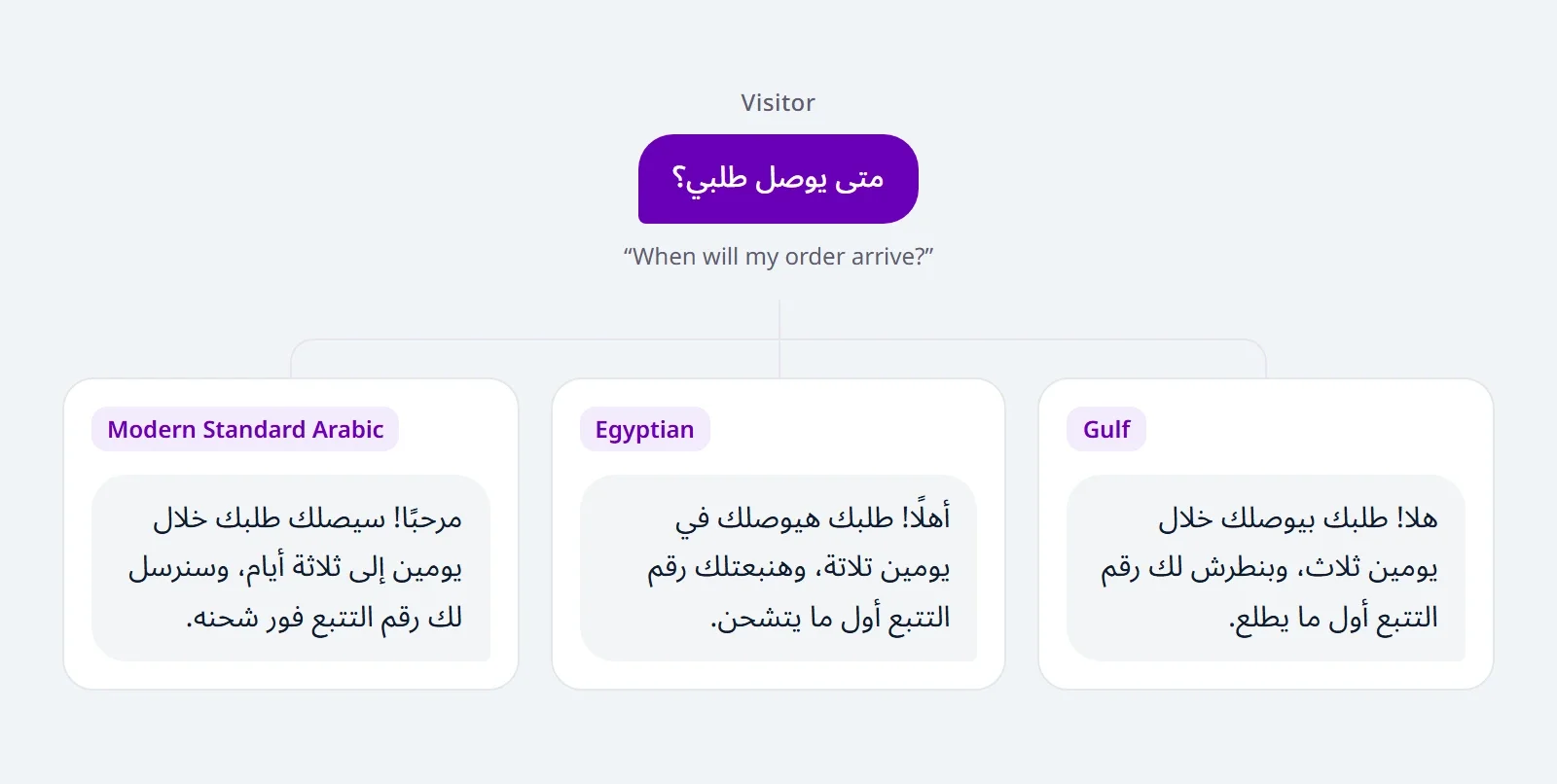
With Visitor's language, a visitor who types Arabic in Latin letters (Arabizi), such as 3ayez, gets an Arabic reply in the dialect you chose.
Test after every change
Open Try it, click New chat, and ask one question in Arabic and one in English, in different dialects, to see the effect before your visitors do.
The rules your agent follows in every chat have their own article: Write rules for your agent.
Limits
What | Limit |
|---|---|
Role | One line, up to 160 characters |
Dialects | Modern Standard Arabic, Egyptian, Gulf, Levantine, or the visitor's own |