Upload files: PDF, Word and text
Teach your agent from your files: upload PDF, Word, TXT or Markdown, up to 10 MB each and 10 at a time, and learn why a scanned PDF can't be read.
3 min readاقرأ المقال بالعربية
A price list, a return policy, a product manual: upload the file, and we read its text and add it to your agent's knowledge so it can answer from it.
Who can do this: members who can add knowledge.
Upload your files
Open your agent, then Knowledge → Files.
Click Upload files.
Drag the files into the box, or click Choose files. You can pick up to 10 files at a time.
Click Add content.

Each file shows what's happening to it: Uploading with a percentage, then Checking… while we confirm the file's real type, then Added. The file then appears in the table as Queued, then Learning, then Ready.
Files we can read
Type | Notes |
|---|---|
Read page by page. The text must be selectable. | |
Word |
|
Text ( | UTF-8 encoded. |
Older Word files (.doc) and images aren't accepted. Open a .doc file in Word, save it as .docx, then upload it.
Why did my scanned PDF fail?
A scanned PDF is pictures of pages, with no text in it. We read text only and can't pull text out of images yet, so the status becomes Failed with the reason "No selectable text found."
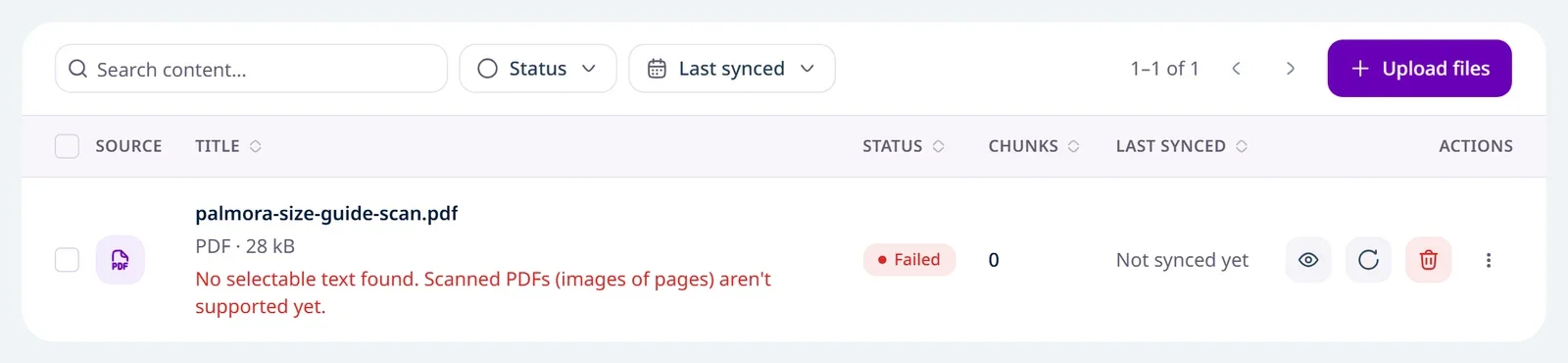
To check before you upload: open the file and try to select a word. If you can't, it's images.
What to do:
If you have the original (a Word file or another document), export it to PDF again or upload it as
.docx.Or copy the important text and paste it under Knowledge → Text.
Re-sync reads the same stored file again. If the problem is the file itself (scanned, password-protected, too long), delete the source and upload a fixed copy.
Other reasons a file can fail
Reason | Fix |
|---|---|
The PDF is password-protected | Remove the password, then upload it again. |
Too much text (over 300 PDF pages or a million characters) | Split it into smaller files. We never cut a file short without telling you. |
The file is damaged or couldn't be opened | Open it on your computer, save it again, and upload it. |
Reading took too long | Re-sync, or split the file. |
Check what we read
From the file's row actions, choose Open details to see the Extracted text as we read it, and What your agent learned. You can't edit the text here: edit the file and upload it again.
Uploaded files have no download link. Keep your original copy.
Limits
What | Limit |
|---|---|
Size of one file | Up to 10 MB |
Files per upload | Up to 10 |
Files per agent | Up to 100 |
Pages in a PDF | Up to 300 |
Text extracted from one file | Up to 1,000,000 characters |