Business info: the facts your agent quotes exactly
Add your business name, phones, email, branches and links once. Your agent quotes them exactly and never guesses a detail you leave empty.
3 min readاقرأ المقال بالعربية
Visitors often ask for your phone number, your address or your WhatsApp link. Write these once in Business info and your agent quotes them exactly as you wrote them, without rewording. If you leave a field empty, it never guesses it.
Who can do this: members who can edit knowledge. Members who can only view it see the details but can't change them.
Add your business info
Open your agent, then Knowledge → Business info.
Fill in what applies to your business from the sections below. You don't need all of them.
Click Save changes.
Section | Fields |
|---|---|
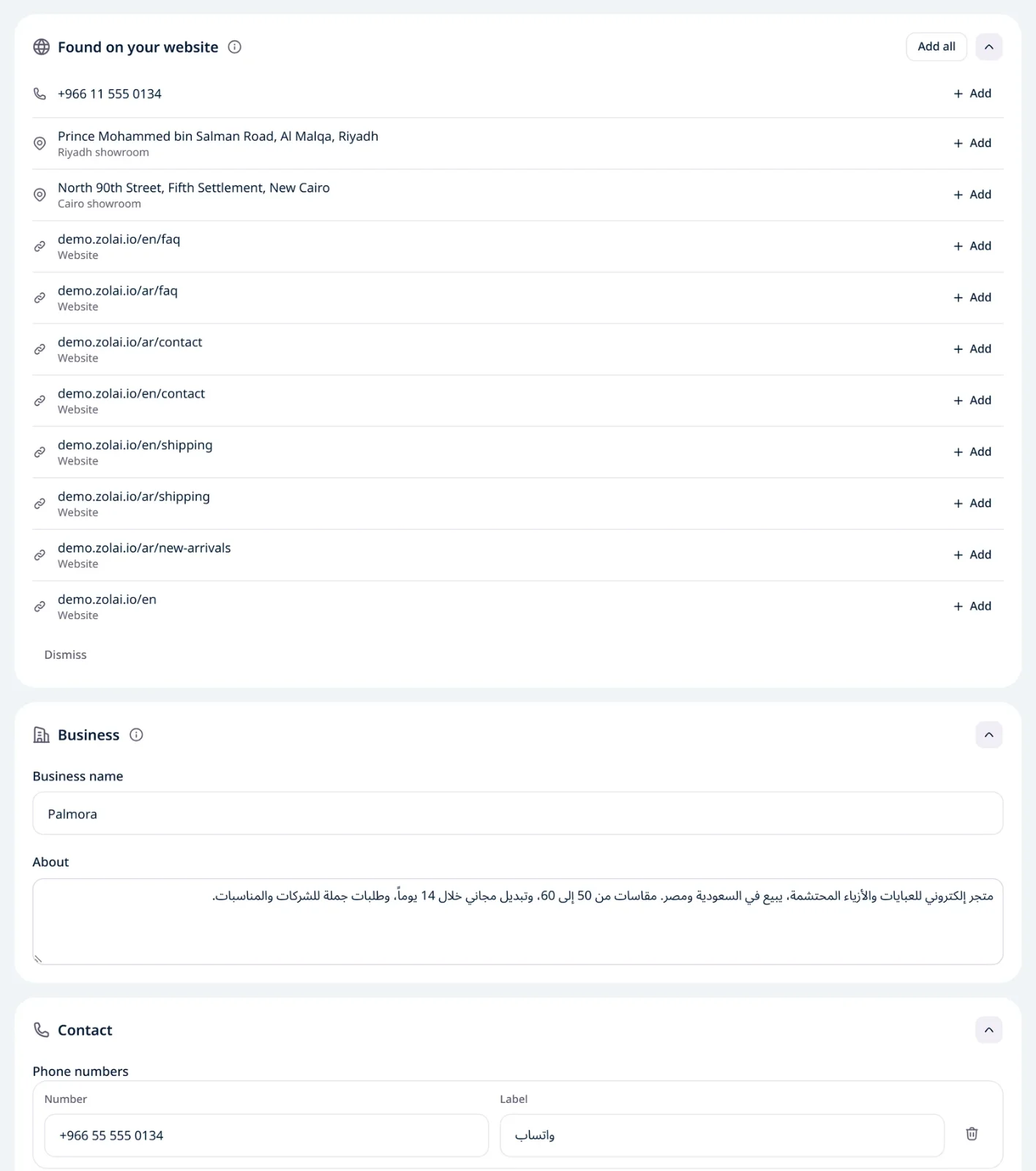
Business | Business name, and a short About: what you do, in two or three sentences. |
Contact | Phone numbers, each with a Label such as "WhatsApp" or "Sales". Then Email. |
Addresses & branches | For each branch a Name and an Address, plus a Map link if you want your agent to share directions. |
Links | For each link a Type (Website, WhatsApp, Instagram, Facebook, X, TikTok, Snapchat, LinkedIn, YouTube, Other) and the Link itself. |
Write numbers the way visitors should see them, with the country code, for example +966 50 123 4567. The field takes digits, spaces and + - ( ) . only.
How your agent uses it
Quoted as written: phone numbers, the email, addresses and links reach the visitor exactly as you typed them.
It wins over other content: if an old page on your site shows a different number, your agent goes by Business info.
No guessing: an empty field isn't sent to the agent at all. If you haven't added an email and it isn't in your content, the agent won't make one up.
So put here what must always be exact, and keep prices, policies and longer details in your website, files and Q&As.
Opening hours live elsewhere
Opening hours are set in Behavior → Availability, because they also decide when your team answers. Click Open business hours in the Opening hours card to get there.
Found on your website
After we first read your website, and after every successful crawl of it, we look through its pages for phone numbers, emails, addresses and links that aren't in your business info yet. They show in Found on your website at the top of the page.
Click Add next to a value to add it, or Add all to add every one.
Click Dismiss to hide the ones you don't want. We won't suggest them again.
We only suggest what is actually written on your pages, and nothing is added until you add it. Added values go after yours, within each field's limit, and an email is only added when the Email field is empty. Nothing you wrote yourself is ever changed or removed.
If you built your agent from your website, the contact details you ticked in Review your agent are already here, and the ones you left unticked wait in Found on your website.
Limits
What | Limit |
|---|---|
About | 1,000 characters |
Phone numbers | Up to 5 |
One | |
Addresses & branches | Up to 5 |
Links | Up to 10, public links starting with |