What Zolai is and how it works
Zolai is an AI agent that answers your website visitors in Arabic and English from your own content, hands chats to your team when needed, and collects leads.
3 min readاقرأ المقال بالعربية
Zolai adds a chat window to your website where an AI customer support agent answers your visitors, in Arabic or English, using only the content you give it. When a visitor needs a person, the chat moves to your team.
How Zolai works
You teach your agent your content: your website, files, Q&As you write, text you paste, your product catalog and your business info.
The agent answers your visitors: in the chat window on your site, it searches your content and answers from it. If the answer isn't in your content, it doesn't make one up.
Your team takes what needs a person: the agent hands the chat over with a short summary of what the visitor wants, and someone on your team replies from the Inbox.
You follow the results: leads reach you, and Analytics shows the questions it found no answer to, so you can add them to Knowledge.
What your agent can do
Answer from your content: it reads up to 50 pages of your website, PDF, Word and text files, and the Q&As you write. Your business info (phone, address, links) it quotes exactly as you wrote it.
Speak your visitors' language: you choose the Reply language (Arabic, English or the visitor's language) and the Arabic dialect: the visitor's own, Modern Standard Arabic, Egyptian, Gulf or Levantine.
Hand over to your team: when a visitor asks for a person or the agent has no answer, your team takes the chat in the Inbox and replies right there.
Collect leads: it asks for contact details when a visitor shows interest and sends them to your email, or to your own system by webhook on plans that include it.
Do more than answer: from Skills it can suggest catalog products as cards, share a booking link, or show buttons such as WhatsApp and call.
Today Zolai works on your website, through the chat window. There's no WhatsApp or Instagram channel; WhatsApp in Zolai is a button that opens a chat with your number.
The dashboard at a glance
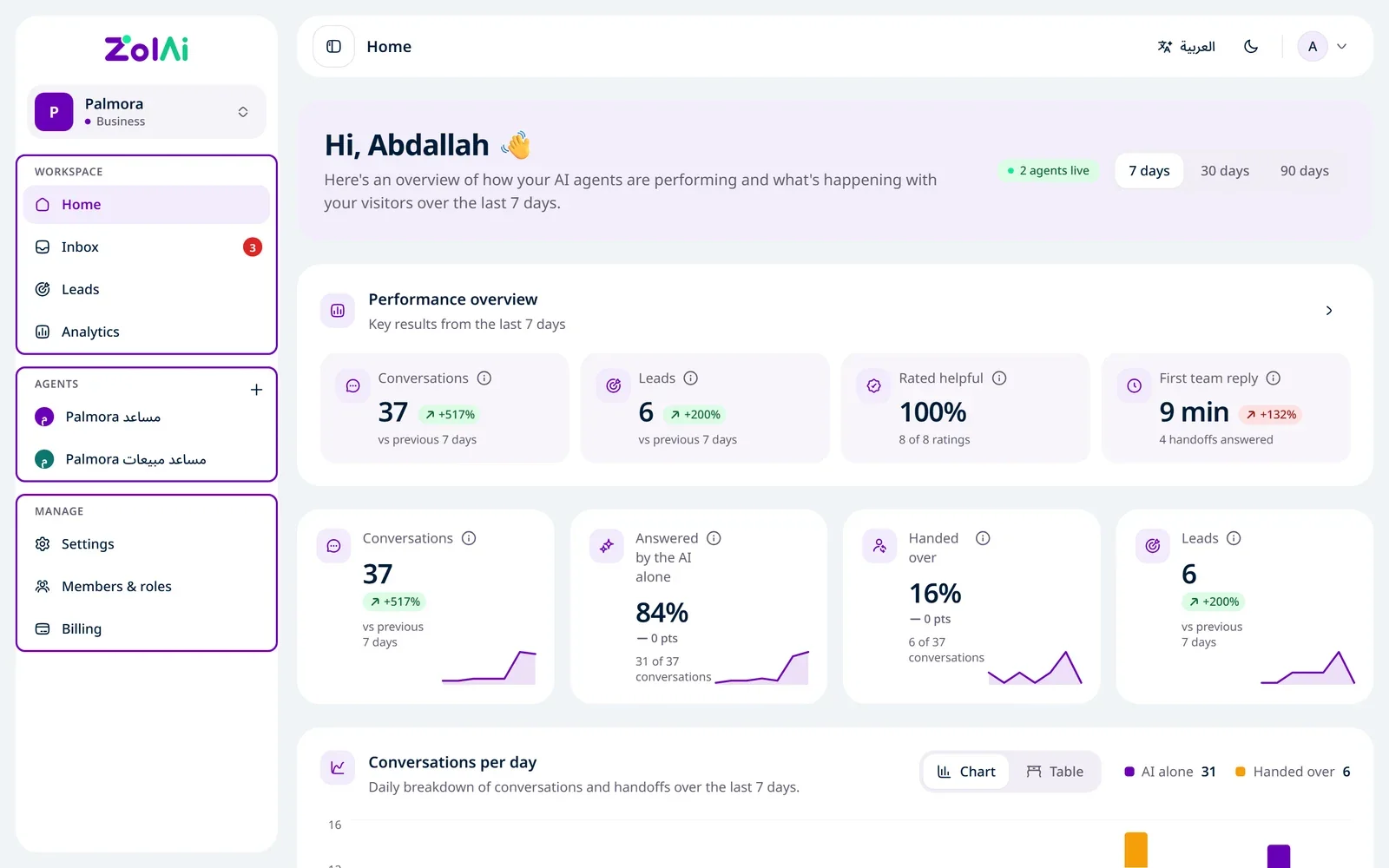
The sidebar has three groups:
Group | What's in it |
|---|---|
Workspace | Home, Inbox, Leads, Analytics |
Agents | Each agent's pages: Overview, Try it, Knowledge, Behavior, Appearance, Skills, Install |
Manage | Settings, Members & roles, Billing |
Each teammate sees only the pages their role allows.
Get started in minutes
Create your account with a 6-digit code sent to your email, or with Google. There are no passwords.
Build your first agent from your website: enter the link, and we read the pages and suggest a name and questions.
Test your agent by asking what your visitors would.

Install the chat on your website: copy the Embed code and paste it into your site.
Watch real conversations arrive in the Inbox.
You start with a 14-day free trial, no card needed.